OTS Editor is a software program for editing OTS sections in Yamaha keyboard Style Files.
Download Page - Program Help - Technical Problems - Information about OTS

OTS Editor is a software for editing all parameters in OTS sections in Yamaha keyboard style files.

Besides this the program can export and import OTS sections to/from style files meaning that entire OTS sections can be saved to HD and be reused in a number of styles. Furthermore entire OTS sections can be imported directly from other style files. Open the File menu.

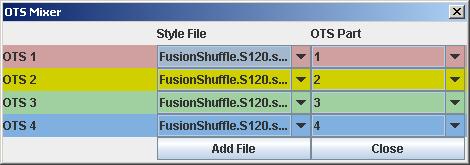
OTS Mixer, which lets the user
- use the mixer to create some template OTS sections (e.g. one for jazz; one for rumba etc.)
- export these templates to OTS files
- import one of these template OTS into the style

NOTE: Separate OTS Files created to work with PSR 9000 styles can NOT be imported as these have another file format.

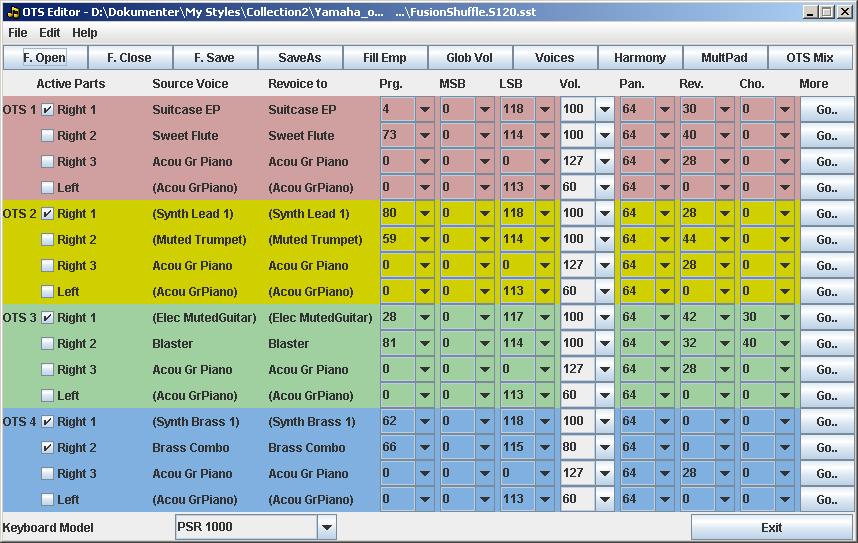
The most common parameters can be edited in the main window:

OTS Editor

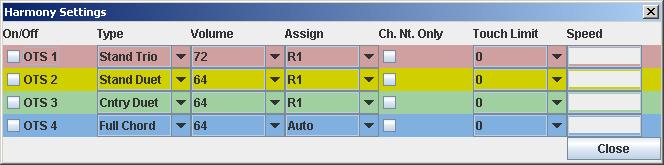
The Harmony settings window is found in menu Edit | Harmony Settings

OTS Editor Harmony

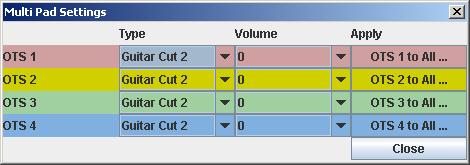
The Multi Pad settings window is found in menu Edit | Multi Pad Settings

OTS Editor Multi Pad

The OTS Mixer window is found in menu Edit | OTS Mixer

OTS Editor Mixer

For selecting voices - or revoicing - go to menu Edit | Voice Selector
Note: Setting the Prog.; MSB; and LSB values in the Main window will do the same!
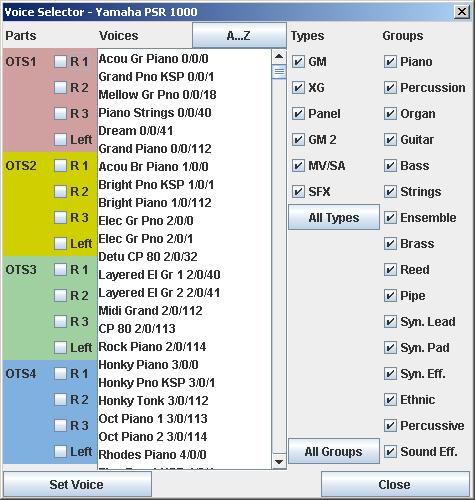
OTS Editor Voices

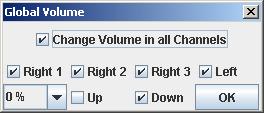
The volume can be changed globally for all channels in menu Edit | Global Volume

OTS Editor Volume

The detailed OTS settings can be found by pressing a "Go ..." button below the heading "More" in the Main window.
The settings in the opened window apply to the selected OTS part.
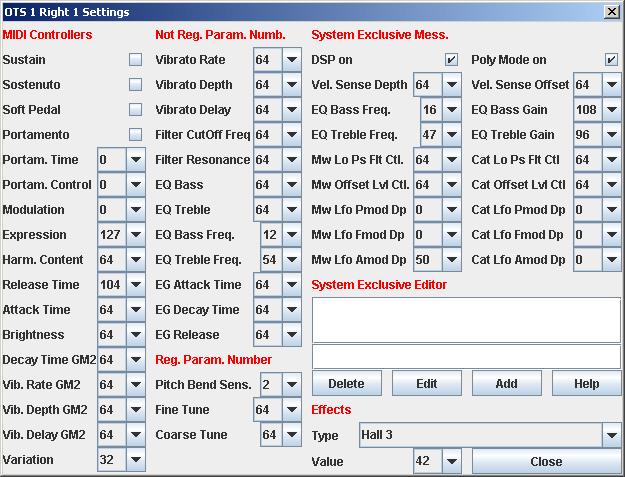
OTS Editor DSP

Version history

VersionDateChanges
2.162010-02-03Save locations for user settings file and log files have been changed due to permission problems in Windows Vista and Windows 7 in some configurations.
Internal code revision.
2.152009-10-03Support for PSR S550/S550B; PSR S710 and PSR S910.
Some bugs in the MultiPad settings window corrected.
Added multilingual Online Help. Accessible from within the program, and from this page.
If you upgrade you MUST run Java Runtime Environment (JRE) version 1.6 at your computer. More information about getting and installing JRE at the Download Page.
2.142009-01-30New feature: OTS Mixer for mixing OTS sections from more files.
Changed feature: Global Volume can be assigned individually to R1, R2, R3 and L.
2.132008-12-29Support for DGX 630/YPG 635.
Errors in Tyros 3 Voice list corrected.
2.122008-07-12Updated to Tyros 3
Buttons at the User Interface corresponding to most Menu elements
Volume values are highlighted for better orientation
Global Volume settings are remembered while the program is running
Style File Name is visible in the Title Bar - even for very long file paths
2.112008-07-12Help file in German and in Danish.
2.102008-02-24Support for DGX 620/520 and YPG 625/525.
2.092008-02-02Support for PSR 550.
2.082007-12-10Support for CVP 409/7/5/3/1 and PSR OR700 voices. NB: PSR OR700 Multi Pads NOT implemented yet
2.072007-10-09The number of active OTS parts in the style is now selectable.
In the Main window just uncheck 'Right 1', 'Right 2', 'Right 3' and 'Left' in not-wanted OTS parts.
2.062007-08-14Support for PSR S900 and PSR S700 voices
If you upgrade you MUST run Java Runtime Environment (JRE) version 1.5 or better at your computer. More information about getting and installing JRE at the Download Page.
2.052005-12-05Support for PSR-K1 and DGX-505/305/500/300 voices
2.042005-10-29Support for CVP-309/307/305/303/301 voices
2.032005-10-19Support for Tyros 2 Multi Pads
2.022005-10-15Support for Tyros 2 features, except Multi Pads
2.012005-02-01Code revision. No new features
2.002005-01-19Program completely rewritten
 2004-07-10OTS Editor 1.01 removed due to some critical errors; too few features; unfriendly User Interface; etc.
1.012004-07-03Code revisions
1.002004-06-06Initial release