Windows systems only - Downloading, installing and running programs
Download program
• Click the program Download (Win) link and save the setup file at your computer.
Install program
• Run the downloaded setup file while following the instructions.
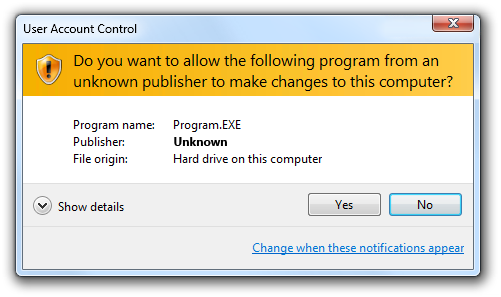
When running the setup you might get a warning asking if you want to install a program from an "unknown publisher"... Well, Microsoft does not know me... Click "Yes" if you trust me...
I could pay annual fees to a "Authenticode Code Signing Certificate" to avoid this...
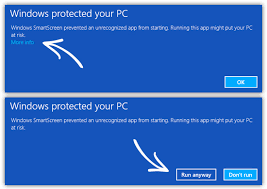
You might now get a window saying "Windows protected your PC". You then need to press "More info" and then "Run anyway".
Run .Net and Java programs
Recommended Method
• Start the program from the shortcut created when installed.
Run .Net programs - Alternative Method
• Start a .Net program exe file from Windows Explorer. More....
Run Java programs - Alternative Method
• Start a Java program jar file from Windows Explorer. More....
All systems - Downloading, installing and running programs
Download program
• Click the program Download (zip) link and save the file at your computer.
Install program
• Unzip the downloaded file to a folder. Keep all files in this folder!
Run .Net program in Windows
• Start a .Net program exe file from Windows Explorer. More....
Run Java program in Windows
• Start a Java program jar file from Windows Explorer. More....
Run Java program in other systems
• Normally a program can be run using the command
where
is the Main class file name without the file extension.
Find the Main class file name below the download links above. For the midi2style program this command is
Make sure the name is written exactly like shown at this page. Capitalization matters!
Note for Mac: Just double click the Main class file. If this does not work due to security settings, perform the following:
1. In the Finder, locate the Main class file you want to open. Do not use Launchpad for this.
2. Press the Control key, then click the Main class file icon.
3. Choose Open from the shortcut menu.
4. Click Open.
When done you will be able to open the Main class file by double-clicking it.
You should carefully read the following terms and conditions before using these programs.
Copyright
Copyright laws apply to these programs, and the copyright holder retains all rights.
Altering, decompilation, inclusion as part of another system, uploading to web sites or file servers,
inclusion at cd's, copying to other persons etc. without permission from the holder of copyright is strictly prohibited.
Disclaimer
Users of these programs must accept this disclaimer:
These programs and related documentation are supplied as is. The author disclaims all warranties, expressed or implied,
including, without limitation, the warranties of fitness for any purpose. The author assumes no liability for damages,
direct or consequential, which may result from the use of - or inability to use - these programs.
 where
where
 is the Main class file name without the file extension.
