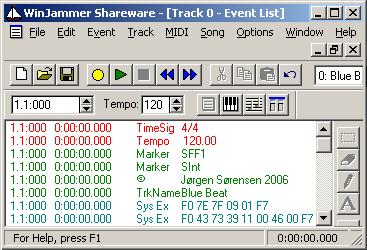
• Copyright notice
• Track Name (= Style Name)
• System Exclusive Messages
- GM System On = F0 7E 7F 09 01 F7
- Yamaha = F0 43 73 39 11 00 46 00 F7
Furthermore is often added:
- XG Works On = F0 43 76 1A 10 01 01 01 01 01 01 01 01 F7
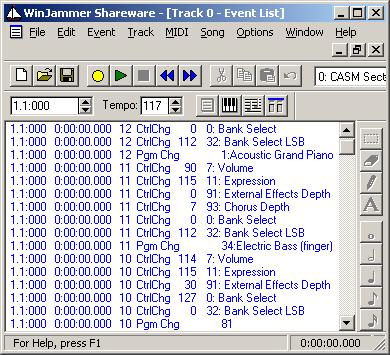
Next thing to do is to add voices - and voice parameters - to the channels 9 - 16 within the first measure of the MIDI file as shown partly below.
In this example we add to each voice:
• Volume, Expression and Chorus Controller data
• Voice MSB Bank, LSB Bank and Program Change - in this order
As shown we have added in Channel 10: Drums; in Channel 11: Electric Bass (finger); and in Channel 12: Acoustic Piano. There are added other non-shown instruments in channels 13, 14, 15 and 16.
You can place an instrument in any MIDI channel, except channel 10 which is a Drum channel only.
In this course we will follow a "simple" layout (MIDI source channel = Keyboard destination channel).
A typical setup will be:
• 09: Rhythm Sub: Often the various Latin American percussion instruments
• 10: Rhythm Main: The drum set
• 11: Bass: Any bass instrument, or piano, or tuba
• 12: Chord 1: Often Rhythm Guitar
• 13: Chord 2: Often Rhythm Guitar or Piano
• 14: Pad: Often a "floating" voice like Strings or Choir
• 15: Phrase 1: Small melodic phrases often played on a brass instrument
• 16: Phrase 2: Small melodic phrases often played on a brass instrument