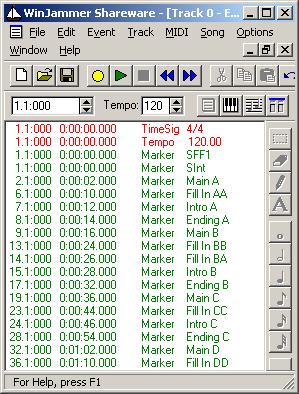
In newer keyboards valid style part names (Text Markers) are:
• "Main A", "Main B", "Main C", "Main D"
• "Intro A", "Intro B", "Intro C"
• "Ending A", "Ending B", "Ending C"
• "Fill In AA", "Fill In BB", "Fill In CC", "Fill In DD", and "Fill In BA" (Break).
Each style part can be from 1 to 128 measures in length, except Fill In parts which must be 1 measure long. Typical lengths are:
• Intro parts: 1 to 8 measures
• Main parts: 4 to 8 measures
• Ending parts: 1 to 8 measures
The first measure holds voice definitions, volume, reverb, chorus, pan etc. settings and have two Text Markers "SFF1" and "SInt" (newest keyboards: "SFF2" and "SInt").
In the table is shown a part of the style parts and the corresponding Markers.
| MIDI data | Measure | Style part |
| 1 | SFF1 SInt | |
| 2-5 | Main A | |
| 6 | Fill In AA | |
| 7 | Intro A | |
| 8 | Ending A | |
| 9-12 | Main B | |
| 13 | Fill In BB | |
| 14 > | more parts | |
| Non-MIDI data | CASM, OTS and MDB | |
Each style part can hold information in a maximum of 16 channels. These are known as "Source Channels". The default Yamaha destination channels (output channels at the keyboard) are shown in the table.
| Dest. ch. | Acc. part |
| 09 | Rhythm Sub |
| 10 | Rhythm Main |
| 11 | Bass |
| 12 | Chord 1 |
| 13 | Chord 2 |
| 14 | Pad |
| 15 | Phrase 1 |
| 16 | Phrase 2 |
A "simple" style will have equal source channel and destination channel layout. If another channel layout or more than 8 channels are used in the style file the source channels must be redirected in the CASM section. This topic is discussed in part 10.
For this course we will start our style project by setting up a MIDI file, and adding Text Markers as shown in the sequencer software event list. We assume that Time Signature and Tempo definitions are added automatically when the file is created, otherwise this must be done too.